CLI Overview
The CLI discovers routes, renders configured browser and viewport combinations, compares pixels, optionally requests model assistance, and writes reports.
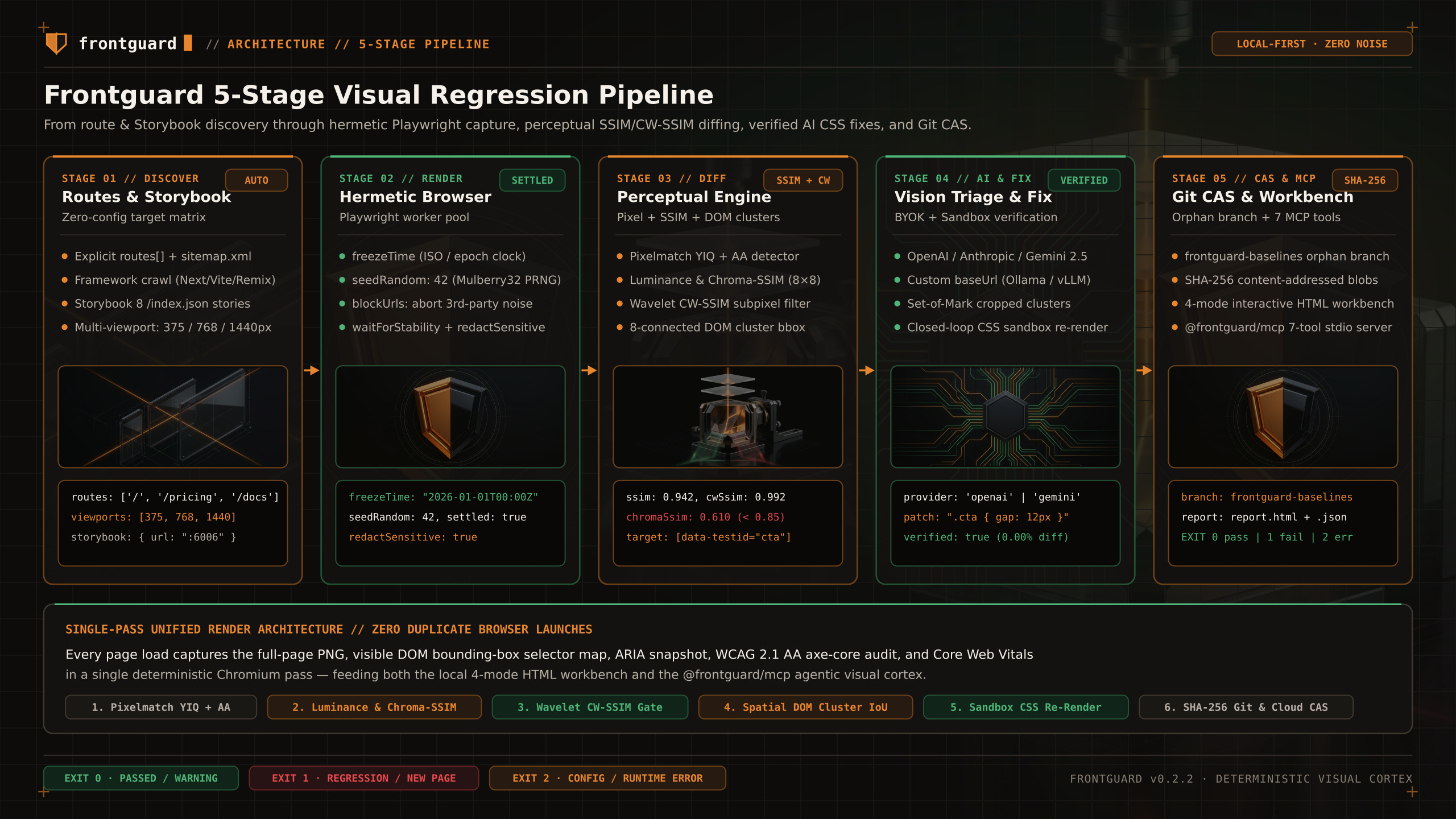
Pipeline
When you execute frontguard run, the CLI orchestrates five deterministic stages in-process:
STEP 01Route & Story Discovery
Combines explicit routes in frontguard.config.ts, automatic crawling from discover.startUrl (up to maxDepth), and Storybook story index discovery (storybook.url). When smartRender: true is enabled, the dependency graph filters routes to those affected by modified source files. A deleted file, a public or static asset, an image or font with no import edge, an unresolved relative import, or a truncated graph renders every route and says why.
STEP 02Hermetic Browser Rendering
Spawns a bounded Playwright worker pool across configured browsers (chromium, firefox, webkit) and viewports (e.g., 375, 768, 1440). Applies optional anti-flake controls (freezeTime, seedRandom, blockUrls, waitForStability, redactSensitive) and executes per-route actions before capturing the PNG and live DOM element bounding boxes.
STEP 03Perceptual Diff & Spatial Clustering
Runs Pixelmatch with YIQ anti-aliasing detection alongside structural similarity (SSIM), Chroma-SSIM (YCbCr color shift sensitivity), and complex wavelet CW-SSIM (subpixel shift tolerance). Connected diff pixels are grouped into 8-connected bounding boxes and intersected with DOM rects to report cluster.targetSelector.
STEP 04Optional BYOK Vision Triage & Fix Sandbox
When ai is configured, sends the baseline, current and diff screenshots (downscaled) with the DOM selectors under each changed cluster to OpenAI, Anthropic, Google Gemini, or a custom OpenAI-compatible baseUrl. If generateFixes and verifyFixes are enabled, tests candidate CSS patches in an isolated Playwright or Daytona sandbox.
STEP 05Artifact Emission & Exit Gate
Writes the interactive HTML workbench, optional JSON/JUnit reports, and exits with a deterministic status code (0, 1, or 2).
Artifacts
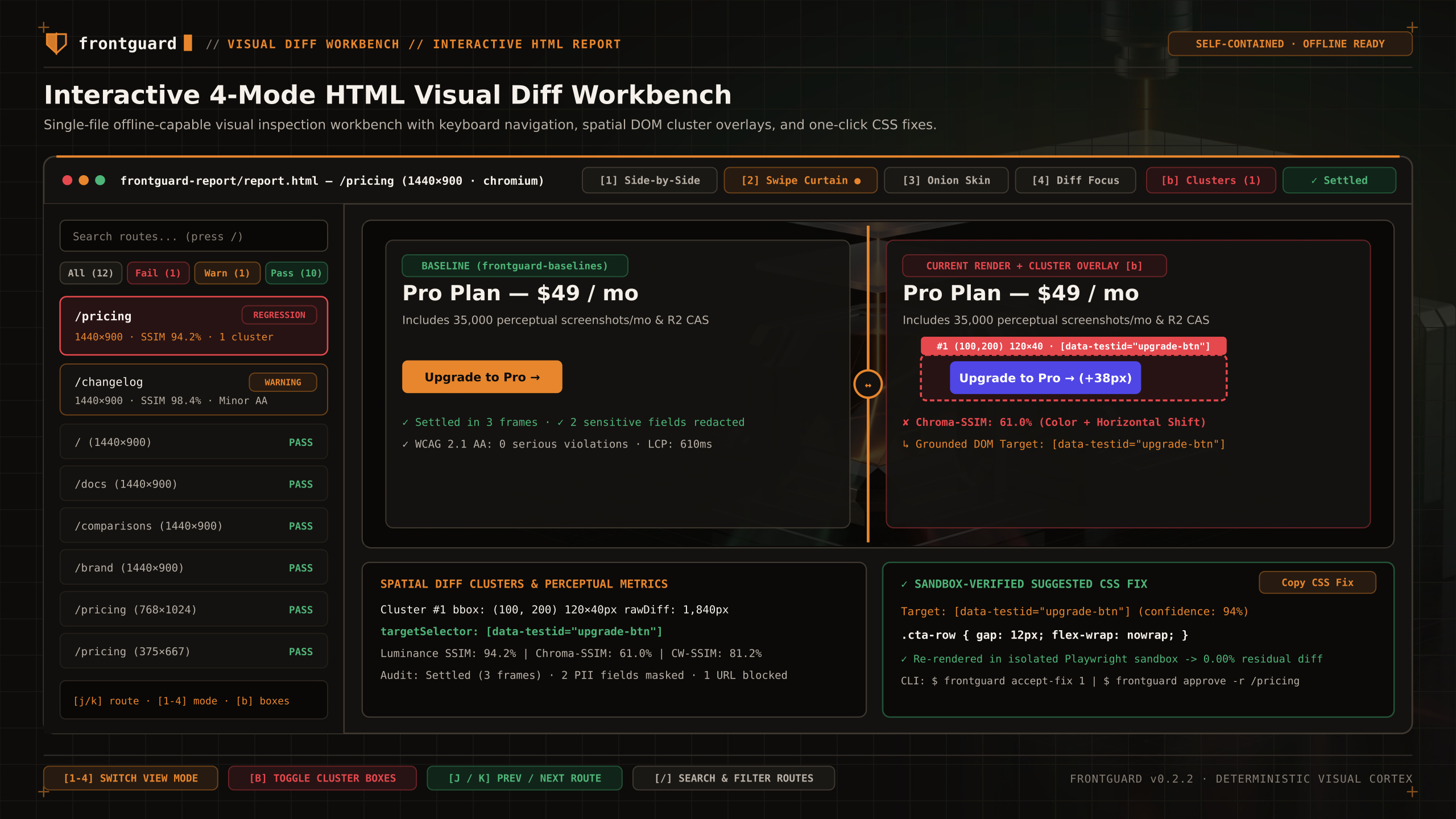
- Baselines live on the frontguard-baselines orphan branch.
- JSON mode writes machine-readable output to stdout.
- The HTML report keeps baseline, current, and diff evidence on disk.
| Artifact / Mode | Flag / Config | Contents & Purpose |
|---|---|---|
Console Summary | Default (stdout) | Per-route pass/warn/fail table, diff ratios, SSIM scores, cluster selectors, and AI explanations. |
Interactive HTML Workbench | frontguard-report/report.html | Self-contained offline viewer with Side-by-Side, Swipe Curtain, Onion Skin, Diff Focus, and cluster overlays. |
Machine-Readable JSON | --output json | Complete structured run telemetry emitted to stdout (pipe to ./frontguard-result.json or consume via @frontguard/mcp). |
Baseline storage
Instead of committing megabytes of PNG screenshots onto your main branch or requiring a paid SaaS bucket, Frontguard commits approved baselines to an isolated git orphan branch named frontguard-baselines. Unchanged screenshots are deduplicated by SHA-256 hash so git history stays lean.
Next step
Continue with CLI Commands for the supported command and exit-code contract, or Configuration for full frontguard.config.ts recipes.