Frontguard
SUPPORTED PATH. The local MIT-licensed CLI runs without a Frontguard account. Hosted and marketplace surfaces remain pre-release.
Frontguard is a local-first visual regression testing toolkit for frontend teams. It renders your web pages or Storybook components in real browsers, compares pixels and perceptual similarity (SSIM, Chroma-SSIM, CW-SSIM) against reviewed baselines stored on a dedicated git orphan branch, and writes an interactive offline HTML workbench.
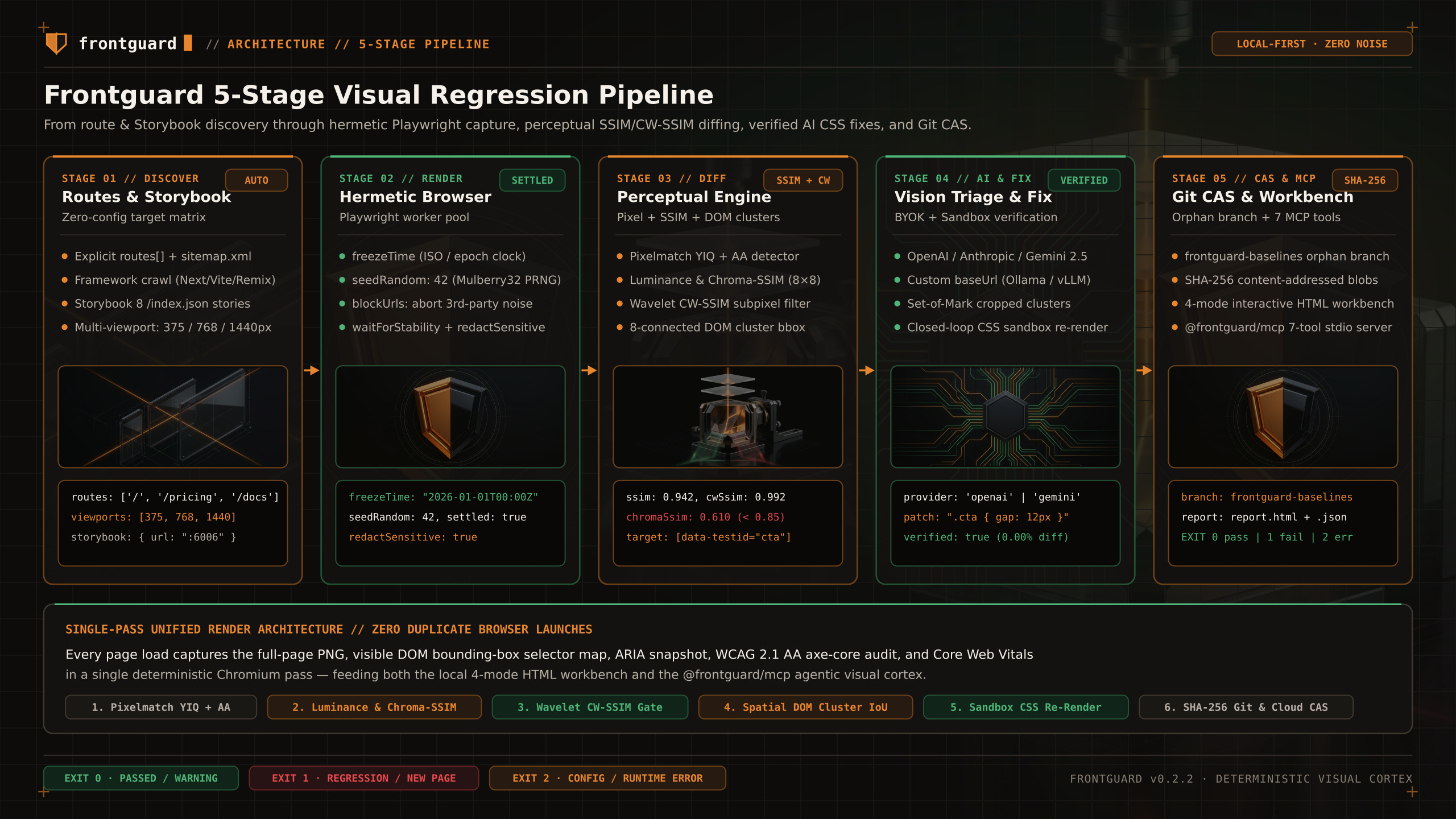
Supported path
Frontguard renders configured pages, compares screenshots against reviewed baselines, and writes console, JSON, and HTML evidence. Optional model-assisted analysis runs only when you configure a provider.
| Stage | What Runs Locally | Output / Artifact |
|---|---|---|
1. Discover | Reads explicit routes from frontguard.config.ts, crawls your live app sitemap, or queries Storybook /index.json. | Normalized route × viewport × browser matrix |
2. Render | Launches a bounded Playwright worker pool with optional anti-flake controls (waitForStability, freezeTime, seedRandom, blockUrls, redactSensitive). | Deterministic PNG captures + DOM bounding boxes |
3. Compare | Runs Pixelmatch with anti-aliasing filters plus Luminance SSIM, Chroma-SSIM (YCbCr), and Wavelet CW-SSIM. | 8-connected spatial diff clusters mapped to DOM selectors (cluster.targetSelector) |
4. Analyze (Optional) | If BYOK AI is configured (OpenAI, Anthropic, Gemini, or custom baseUrl), classifies diffs and optionally tests candidate CSS patches in a sandbox. | Advisory classification, confidence score, and verified/unverified patch status |
5. Report & Store | Stores approved baselines on the frontguard-baselines git orphan branch and writes local inspection artifacts. | Console summary, frontguard-report/report.html (4-mode workbench), and JSON output |
Choose your workflow
Crawl or list routes in frontguard.config.ts, capture multi-viewport baselines onto the frontguard-baselines git orphan branch, and gate PRs in CI.
Drop visualTest(page, name, options) directly inside your existing Playwright .spec.ts tests after complex login flows, form fills, or modal interactions.
Connect Claude Code, Cursor, or Windsurf to your local frontguard-report/report.json over stdio JSON-RPC to inspect diff clusters and DOM selectors.
Quick start
Run these four steps in any Node.js 22+ git repository to initialize Frontguard, capture reviewed baselines, and run your first comparison:
In a separate app terminal, use your project's dev-server command and leave it running. The command below is one example; wait for the baseUrl generated in frontguard.config.ts to respond.
Then use a Frontguard terminal; these commands read baseUrl from the generated config.
Baseline contract
Ordinary runs never accept CLI screenshots. Review captures first, then use frontguard update-baselines --confirm-baselines explicitly. Unaccepted new pages and regressions exit non-zero.
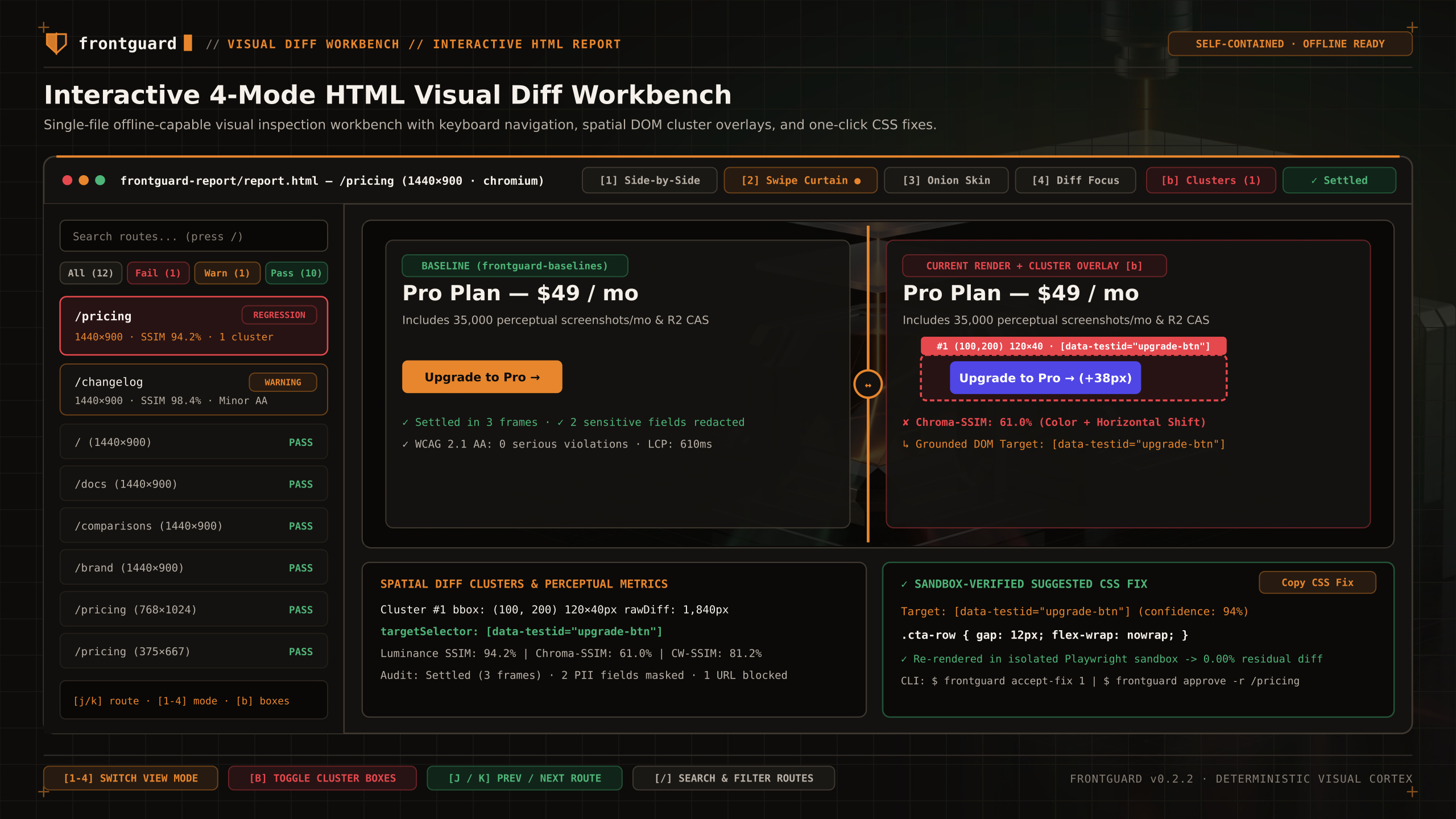
| Exit Code | Meaning | When It Happens |
|---|---|---|
0 | Passed / Warning | All route comparisons matched within threshold (or produced non-blocking warnings). |
1 | Regression / Unaccepted New Page | One or more routes exceeded threshold or had no accepted baseline on frontguard-baselines. |
2 | Tool / Configuration Error | Target server unreachable, invalid config, missing browser binary, or zero routes discovered. |